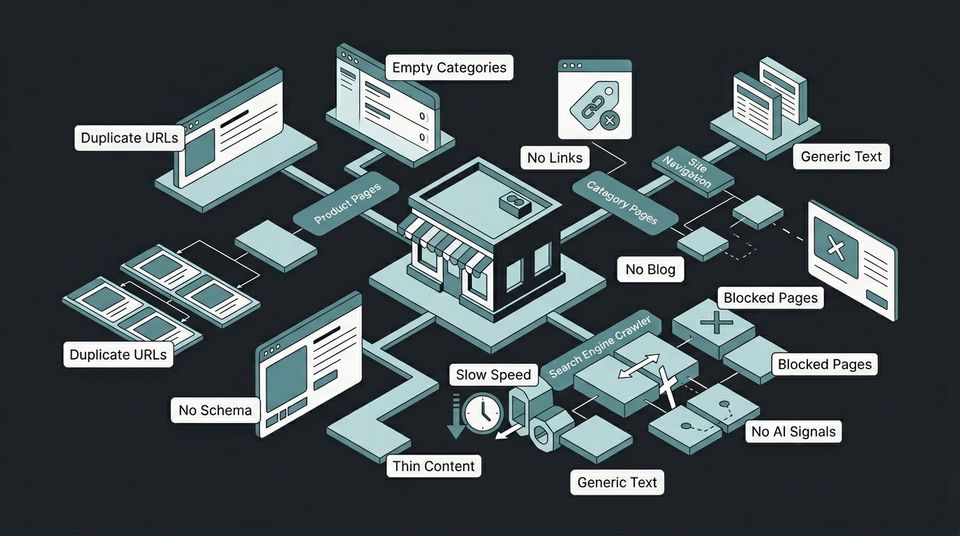
Most ecommerce stores lose organic traffic not because of algorithm changes, but because of structural mistakes baked into their site from day one. After auditing over 300 stores at Interconnections, the same 10 problems appear in nearly every account where organic revenue has stalled or declined. Organic search still drives 43% of all ecommerce traffic and generates 23.6% of online orders. When your store has foundational SEO problems, you are paying more for every customer through paid channels to compensate for traffic you should be getting for free.
This is not a generic checklist. Each mistake below includes the specific benchmark that separates "broken" from "fixed," the revenue impact we see in real audits, and the exact fix to implement. If you are running a $1M to $10M DTC brand and your organic traffic has flatlined, at least three of these are active in your store right now.
1. Thin Product Page Descriptions
Product pages with fewer than 100 words of unique content are effectively invisible to search engines. Google needs text to understand what a page is about, who it is for, and when to surface it. A product title, three bullet points, and a spec table do not meet that threshold.
The benchmark is 300 to 500 words of unique descriptive content per product page. That includes a paragraph explaining the use case, a paragraph covering materials or ingredients, and a paragraph addressing the buyer's most common objection. Pages that hit this threshold see 20 to 40% higher click-through rates compared to thin listings.
In an audit for an arts and crafts brand, Interconnections found that 80% of their product pages had fewer than 50 words of content. After rewriting descriptions across their top 200 SKUs, organic traffic increased 410% over 8 months and the site went from zero to 17 page-one rankings. Thin content was the single biggest constraint.
The fix: Prioritize your top 20% of SKUs by revenue. Write 300 to 500 words of unique content per page that answers the question a buyer would ask before purchasing. Do not duplicate manufacturer descriptions that exist on 50 other retailer sites.
2. No Content on Category and Collection Pages
Category pages that show nothing but a product grid are one of the most common ecommerce SEO mistakes. Search engines treat these as thin doorway pages with no reason to rank them above any other store selling the same products.
Category pages are often the highest-value SEO targets in an ecommerce store because they match commercial intent keywords. Someone searching "organic cotton baby clothes" is not looking for a single product. They want a curated selection, which is exactly what a category page provides. But without 200 to 400 words of contextual content above or below the product grid, Google has no text signal to work with.
A $3M Shopify brand we audited had 34 collection pages with zero text content. After adding keyword-targeted introductions and buying guides to the top 15 collections, those pages accounted for 40% of total organic traffic growth within 6 months. The content took 2 days to write.
The fix: Add a 200 to 400 word introduction to every category page. Include the primary keyword, related product attributes, and a sentence or two about who the category is for. Place it above the product grid for maximum crawl priority.
3. Duplicate URLs from Filters, Variants, and Pagination
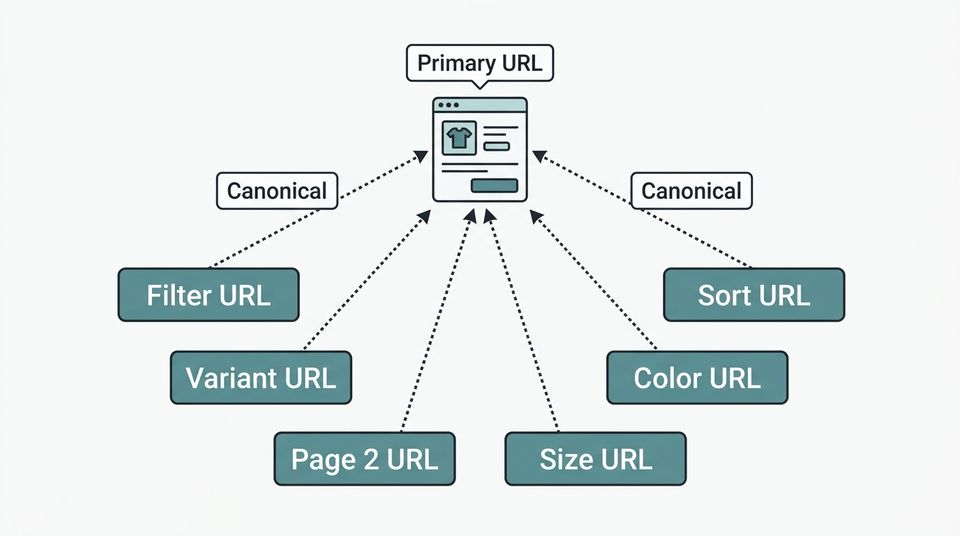
Faceted navigation, color and size variants, and pagination create hundreds or thousands of duplicate URLs that dilute your crawl budget and confuse search engines about which page to rank. A store with 500 products and 8 filter options can generate over 4,000 indexable URLs, most of which are near-duplicates of existing pages.
This is a technical problem that compounds silently. Google's crawler spends its limited budget indexing filter combinations instead of your actual product and category pages. The result is slower indexing, split authority, and pages that should rank getting cannibalized by their own variants.
Shopify stores are especially vulnerable because the platform generates separate URLs for every product variant by default (e.g., /products/shirt?variant=12345). Without canonical tags pointing these back to the main product URL, Google may index the variant page instead of the primary listing.
The fix: Implement canonical tags on all variant and filtered URLs pointing to the primary version. Use the robots meta tag or Google Search Console's URL parameters tool to tell Google which filter combinations to ignore. Audit your indexed URLs in Search Console and request removal of any duplicate pages already in the index.
4. Missing Product Schema Markup
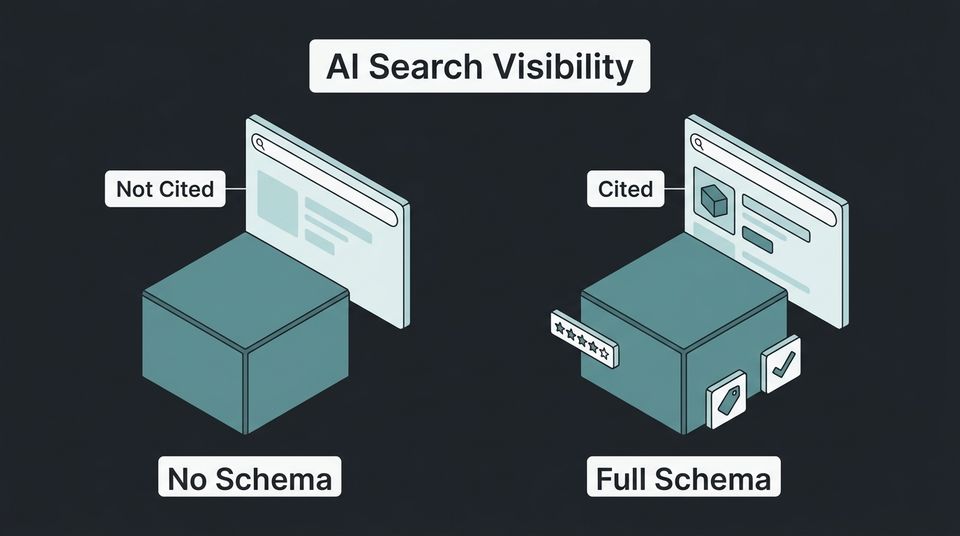
Product schema tells search engines the price, availability, reviews, and condition of your products in a machine-readable format. Without it, your product pages display as plain blue links in search results while competitors show rich snippets with star ratings, pricing, and stock status.
The impact is measurable. Pages with structured data achieve 82% higher click-through rates compared to non-rich results, and product schema specifically delivers 4.2x higher Google Shopping visibility. In 2026, schema is no longer optional because AI search systems like Google AI Overviews and ChatGPT shopping use structured data to decide which products to recommend.
Many Shopify themes include basic product schema by default, but it is often incomplete or outdated. Check your pages using Google's Rich Results Test. If the tool does not show Product markup with price, availability, and reviews, your schema needs work.
The fix: Implement Product schema on every product page that includes name, description, price, priceCurrency, availability, brand, and aggregateRating. If you are on Shopify, use a schema app or add JSON-LD manually to the product template. Test every page type with Google's Rich Results Test before considering it done.
5. Ignoring Site Speed on Mobile
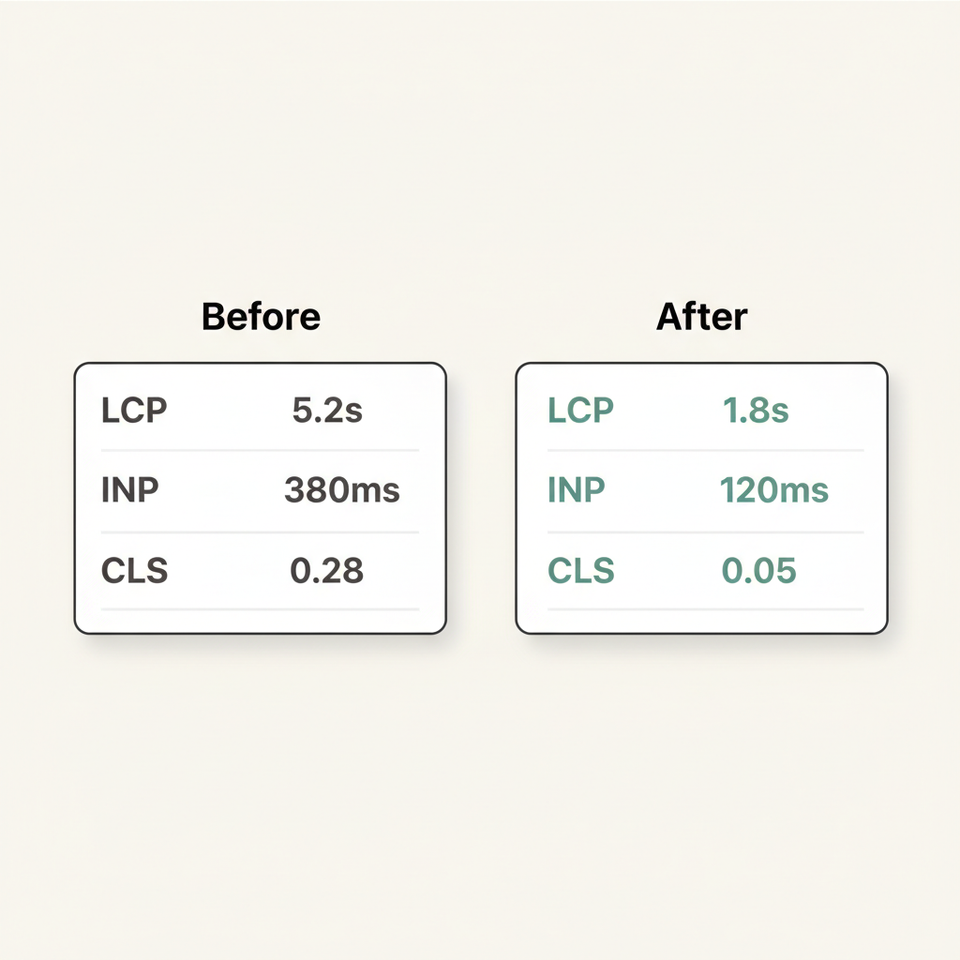
Mobile page speed is both a ranking factor and a conversion factor, and most ecommerce stores fail both tests. Google's Core Web Vitals thresholds require LCP (Largest Contentful Paint) under 2.5 seconds, INP (Interaction to Next Paint) under 200 milliseconds, and CLS (Cumulative Layout Shift) under 0.1. Ecommerce sites that meet all three benchmarks see an average 24% increase in organic traffic within 6 months of optimization.
Amazon found that every 100ms of latency costs 1% in sales. For a $3M DTC brand, a half-second delay could mean $15,000 in lost monthly revenue just from slower page loads. The most common speed killers in ecommerce are uncompressed product images, excessive third-party scripts from reviews and chat widgets, and render-blocking JavaScript from analytics and tracking tools.
Pages ranking at position 1 are 10% more likely to pass Core Web Vitals thresholds compared to URLs at position 9. Speed is not just about user experience. It is a measurable ranking signal that separates page-one stores from everyone else.
The fix: Run every product and category page through Google PageSpeed Insights. Compress all images to WebP format. Defer non-critical JavaScript. Remove or lazy-load third-party widgets below the fold. Target LCP under 2.5s and INP under 200ms as non-negotiable benchmarks.
6. No Internal Linking Strategy
Internal links distribute authority across your site and tell search engines which pages matter most. Most ecommerce stores have no intentional linking architecture. Products link to their category. Categories link to products. And that is the entire link graph.
A proper internal linking strategy connects related products to each other, links products to relevant blog content, connects blog articles back to category and product pages, and creates topical clusters that reinforce your authority on specific keyword themes. Without this structure, your highest-authority pages (usually your homepage) hoard all the link equity while deeper product pages starve.
The industrial manufacturer Interconnections audited had 1,200 product pages with an average of 1.3 internal links each. After implementing a structured internal linking program connecting products to related categories, comparison guides, and use-case content, organic clicks increased 153% and impressions increased 211% in 90 days.
The fix: Map your top 20 category pages and identify which product pages and blog posts should link to each. Add contextual links within product descriptions pointing to related items and category pages. Every blog post should link to at least one product or category page. Aim for 3 to 5 internal links per page as a baseline.
7. Blocking Search Engines with Robots.txt Misconfiguration
Robots.txt mistakes are the most quietly destructive ecommerce SEO errors because they produce no visible error on your site. A single misplaced disallow rule can block Google from crawling your entire product catalog, your category pages, or your checkout flow's associated URLs.
Common robots.txt mistakes in ecommerce include blocking /collections/ or /products/ directories, blocking CSS and JavaScript files that Google needs to render pages, blocking paginated URLs that contain deep catalog products, and accidentally using Disallow: / which blocks the entire site. Interconnections has seen stores unknowingly block crawlers from 30% or more of their indexable pages for months before anyone noticed the traffic drop.
The fix: Open your robots.txt file (yoursite.com/robots.txt) and verify every Disallow rule against your URL structure. Use Google Search Console's URL Inspection tool to check whether key product and category pages are being blocked. Remove any Disallow rules that target product, collection, or category directories. Test changes in Search Console's robots.txt tester before deploying.
8. Not Optimizing for AI Search
AI search is the biggest shift in ecommerce SEO since mobile-first indexing, and almost no ecommerce store is prepared for it. Google AI Overviews now appear on 14% of shopping queries, up from 2.1% in late 2024. For informational shopping queries like "best organic cotton sheets," AI Overview presence is 83%.
The impact on organic traffic is significant. Organic CTR drops 61% on queries where AI Overviews appear. But brands that get cited in AI Overviews earn 35% more organic clicks and 91% more paid clicks than brands that do not. The difference between losing traffic and gaining it comes down to whether your store provides the structured signals AI systems need.
Interconnections covers this in depth in our analysis of how AI search is reshaping ecommerce traffic and CAC. The short version: if your product pages lack schema markup, your site has no entity-level structured data, and you have no content that directly answers buyer questions, AI search systems will cite your competitors instead.
The fix: Implement comprehensive Product, FAQ, and Organization schema across your site. Create answer-format content that directly addresses "best," "vs," and "how to choose" queries in your product category. Optimize your Google Merchant Center feed with complete product data. Track AI search referral traffic in GA4 using the new traffic source filters.
9. Generic Meta Titles and Descriptions
When every product page uses the same template of "Product Name | Store Name" as the meta title, you are competing on brand recognition alone. For a $1M to $10M DTC brand that does not have the name recognition of a major retailer, this is a losing strategy.
Unique meta titles and descriptions are your first conversion opportunity in search results. A generic title like "Blue Cotton T-Shirt | MyStore" tells the searcher nothing about why your product is different. A title like "100% Organic Cotton T-Shirt | Women's Relaxed Fit | MyStore" includes material, fit, and category signals that both search engines and humans can use to decide whether to click.
The benchmark from Semrush's 2026 analysis shows that pages ranking in positions 1 to 5 average 1,500+ words of content and use unique, descriptive meta data. Generic meta data is a symptom of automation done poorly. Shopify's default title tags are often just the product name, which means stores running defaults are all competing with identical search appearances.
The fix: Write unique meta titles (50 to 60 characters) for your top 100 product pages that include the product type, key differentiator, and brand. Write unique meta descriptions (under 155 characters) that include a specific benefit and a reason to click. For remaining pages, build a dynamic template that pulls in product attributes like material, size range, or use case.
10. No Content Strategy Beyond Product Pages
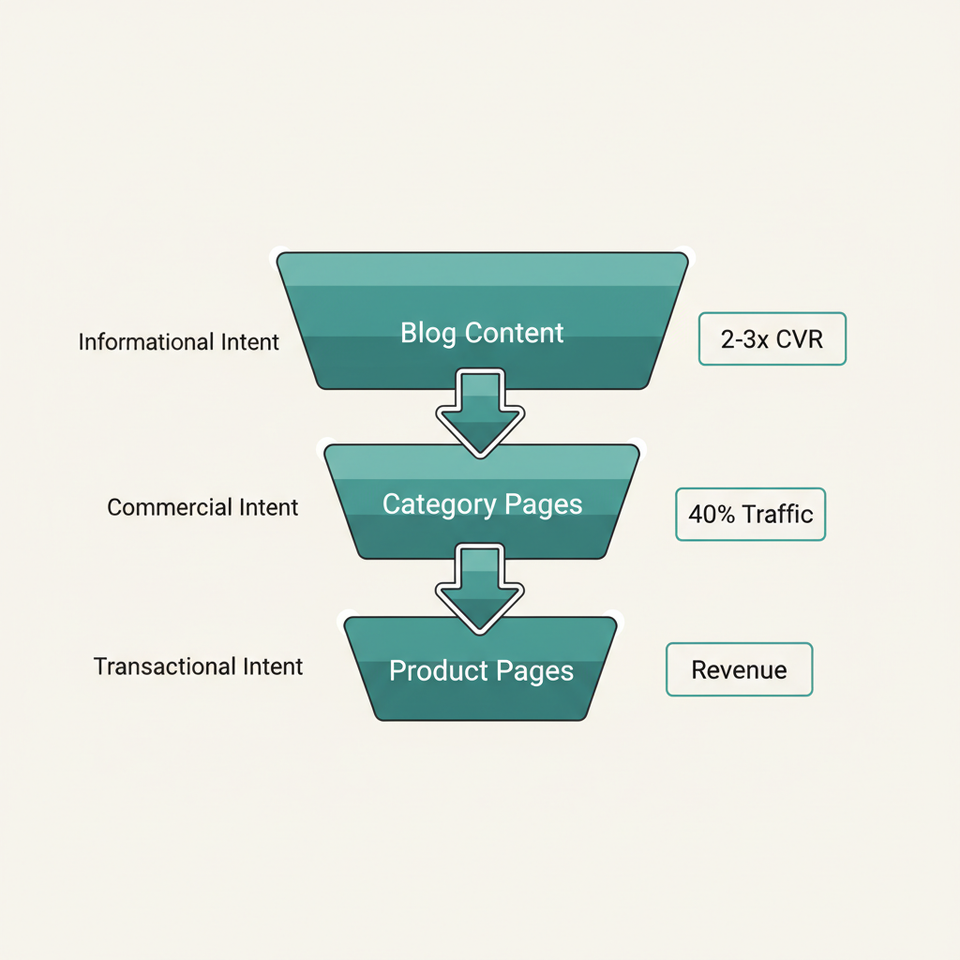
Product and category pages can only rank for transactional and commercial keywords. If your site has no blog, no buying guides, no comparison content, and no educational articles, you are invisible for the entire informational search layer that feeds your purchase funnel.
Organic search works as a funnel. Someone searches "how to choose running shoes for flat feet," reads your buying guide, discovers your brand, and then converts on a product page days or weeks later. Without that top-of-funnel content, you are only capturing buyers who already know what they want and are comparing prices. That is the most competitive and lowest-margin segment of search.
Building a content strategy connects directly to the 12 product page elements that actually move conversion rate because content creates the context that makes product pages convert. A visitor arriving from a buying guide converts at 2 to 3x the rate of a visitor arriving from a generic Google search because they already trust your expertise.
The fix: Start with 5 to 10 articles targeting informational keywords in your product category. Focus on "how to choose," "best X for Y," and "X vs Y" formats. Link every article to at least two product or category pages. Publish consistently and track which articles drive assisted conversions, not just direct revenue.
What Happens When You Fix These Mistakes
Two case studies from Interconnections ecommerce SEO engagements.
Organic Traffic Growth
Arts and crafts brand grew organic traffic from 891 to 4,544 monthly visitors in 8 months by fixing thin content, crawl errors, and site health issues.
Organic Clicks
Industrial manufacturer increased organic clicks 153% and impressions 211% in 90 days through structured internal linking and schema implementation.
AI Overview Appearances
Same manufacturer saw AI Overview appearances increase 275% after implementing comprehensive structured data and answer-format content.
Where to Start When Everything Is Broken
The audit sequence matters because some fixes enable the value of others.
Fix Crawl Access
Resolve robots.txt blocks and crawl errors first. Nothing else matters if Google cannot reach your pages.
Resolve Duplicate URLs
Implement canonical tags and consolidate filter and variant URLs. Crawl budget wasted on duplicates prevents real pages from indexing.
Build Page Content
Rewrite thin product descriptions and add category page content. This is where ranking improvements actually happen.
Add Schema and AI Signals
Implement structured data and AI search optimization. These amplify the value of everything you already fixed.
The Fix Priority: Where to Start
This is the exact audit sequence Interconnections uses in our ecommerce SEO work. The arts and crafts brand that followed this priority order went from a site health score of 67% to 92%, fixed 1,442 crawl issues, and grew monthly organic visitors from 891 to 4,544 in 8 months. The industrial manufacturer saw organic clicks increase 153% and AI Overview appearances increase 275% in just 90 days.
If you are evaluating whether to tackle this internally or bring in outside help, our guide on how to evaluate an ecommerce marketing agency before signing covers what to look for in an SEO partner.
Frequently Asked Questions
How do I know which ecommerce SEO mistakes are hurting my store the most?
Run a technical SEO audit using Google Search Console and a crawling tool like Screaming Frog or Sitebulb. Interconnections recommends starting with the Coverage report in Search Console, which shows exactly how many pages are indexed, excluded, or erroring. The gap between your total pages and indexed pages is your first diagnostic signal.
Is ecommerce SEO still worth investing in with AI search taking over?
Organic search still drives 43% of all ecommerce traffic and 23.6% of online orders in 2026. AI search changes the format but not the value. Interconnections has seen stores that optimize for AI visibility earn 35% more organic clicks than stores that ignore it. The investment shifts toward structured data and answer-format content, but the ROI is still higher than any paid channel at scale.
How long does it take to recover organic rankings after fixing SEO mistakes?
Most ecommerce stores see measurable ranking improvements within 60 to 90 days of fixing technical issues like crawl errors, duplicate URLs, and robots.txt problems. Content improvements like rewriting product descriptions and adding category page content take 3 to 6 months to fully index and rank. Interconnections typically scopes a full SEO recovery timeline at 6 to 8 months for comprehensive results.
What is the minimum word count for ecommerce product pages?
Aim for 300 to 500 words of unique descriptive content per product page. Pages below 100 words consistently underperform in Interconnections audits. The content should answer the buyer's primary question about the product, not just repeat specs. Quality and uniqueness matter more than hitting an exact number.
Do I need a blog if I run an ecommerce store?
Yes. Product and category pages only capture transactional search intent. A blog targeting informational keywords like "how to choose" and "best X for Y" queries builds topical authority and feeds your purchase funnel. Interconnections consistently sees blog content driving 2 to 3x higher assisted conversion rates compared to direct product page traffic from generic search.
What schema markup should every ecommerce store have?
At minimum, implement Product schema (price, availability, reviews), Organization schema (brand identity), BreadcrumbList schema (site navigation), and FAQ schema on any page with Q&A content. Interconnections also recommends Article schema on blog posts and CollectionPage schema on category pages for maximum AI search visibility.
Fix the Foundation Before Increasing the Budget
Every dollar spent on paid media works harder when your organic foundation is solid. If your store has structural SEO problems, you are overpaying for traffic that should be arriving for free. The fixes in this article are not theoretical. They are the exact audit items Interconnections checks in the first week of every ecommerce SEO engagement. If you are seeing flat organic traffic despite consistent product launches, the next step is usually a full-funnel Growth Diagnostic before touching the ad budget. That is exactly what we scope in the first conversation.